
Every great talent show starts with a crowd, and every crowd starts with a flyer someone actually stops to read. Whether you’re organizing a school showcase, a church fundraiser, a community open mic or an office “got talent” night, these talent show flyer templates give you a bold, ready-made starting point so you can spend less time fiddling with fonts and more time lining up acts.
Prepare a talent show flyer with clear performer and audience information. This guide includes one free original editable Excel worksheet, with a preview and a direct download below.
Free Editable Excel Worksheet
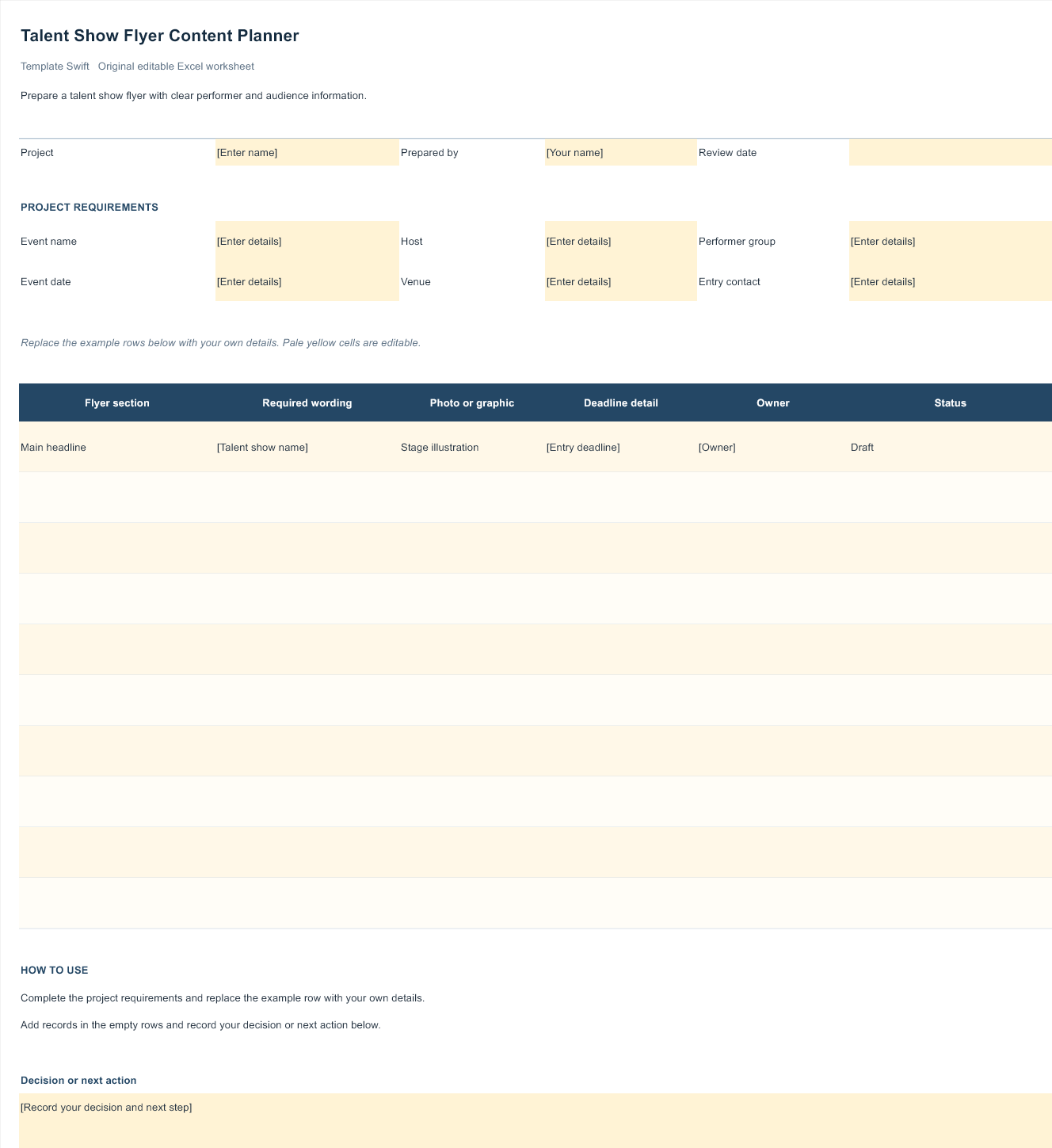
Talent Show Flyer Content Planner
Prepare a talent show flyer with clear performer and audience information. This original Template Swift planning worksheet includes editable fields and an example row you can replace with your own details.
Download Talent Show Flyer Content Planner (.xlsx)
Open the file in Microsoft Excel or a compatible spreadsheet application. Replace the example row, complete the highlighted input fields, and save your own copy.
Two Jobs, One Flyer
Talent show flyers usually have to do two different things, sometimes at the same time:
- Recruit performers. Early flyers invite singers, dancers, comedians, magicians and musicians to sign up or audition.
- Fill the seats. Later flyers promote the show itself to families, friends and the wider community.
You can use one template for both by changing the headline and call to action. A recruitment version might say “Auditions Open: Show Us What You’ve Got!” with sign-up details, while the event version switches to “Talent Night: Friday at 7 PM” with ticket information. Keeping the same colors and graphics builds recognition, so people who saw the first flyer instantly connect it with the second.
What Every Talent Show Flyer Should Say
People glance at flyers for just a moment, so lead with the essentials and make them easy to spot. Here’s a simple checklist:
| Element | Example |
|---|---|
| Event name | Maple Street Talent Night |
| Date and time | Friday, March 6, doors at 6:30 PM, show at 7 PM |
| Venue | School auditorium, 120 Maple Street |
| Tickets or entry | $5 adults, kids free, pay at the door |
| Who can perform | Open to students in grades 3 to 8 |
| How to sign up | Forms in the front office by February 20 |
| Purpose (if any) | All proceeds support the music program |
| Contact | Email or phone for questions |
Fundraisers should say clearly where the money goes. If you’re raising money for a nonprofit or school, check any local rules on raffles, ticket sales or donations, since they vary by state and organization.
Design tips that make flyers pop
- One big headline. “TALENT SHOW” in large, bold letters should be readable from across a hallway.
- Stage imagery helps. Spotlights, stars, microphones and curtains signal “performance” instantly.
- High contrast wins. Light text on a dark stage background, or dark text on a bright one, is easier to read than mid-tone combinations.
- Leave breathing room. Resist cramming in every detail. Put the extras on a sign-up sheet or website instead.
Customizing a Flyer in Five Steps
- Pick a template that fits your audience. Bright cartoon stars suit an elementary school show; a sleek black-and-gold design suits an adult fundraiser or college night.
- Write your text first. Draft the headline, date, venue and call to action in a plain document so you’re not editing wording and layout at the same time.
- Swap in your details. Replace sample text, keep the hierarchy (headline biggest, date next), and delete anything you don’t need.
- Add a scannable extra. A QR code that links to a sign-up form or ticket page saves people from typing a long web address.
- Proof and test print. Ask someone else to check dates and spelling, then print one copy to see how colors and text size look on paper.
Sizes and printing
Standard US letter size (8.5 x 11 inches) works for bulletin boards and handouts. Tabloid size (11 x 17 inches) makes better posters for school hallways, shop windows and community centers. Half-page flyers are a budget-friendly way to send notices home in backpacks or hand out after church services. If you print in color at home, choose a design with a lighter background to save ink, or print a few large color posters and the rest in black and white.
Getting the Word Out
A great flyer only works if people see it. Plan distribution as carefully as the design:
- Two to three weeks before auditions: recruitment flyers on school boards, in classrooms, in newsletters and on social media.
- Two weeks before the show: event posters in hallways, local cafes, libraries, community boards and partner businesses.
- The final week: reminder posts, flyers sent home with students, and a digital version shared by performers with their own friends and family.
Performers are your best promoters. Give each act a small stack of flyers or a shareable image, and they’ll fill a surprising number of seats. If you’re producing other materials for the same event, our summer camp flyer templates and grand opening flyer templates are useful references for bold, readable layouts.
Theme Ideas to Give Your Show a Hook
A theme makes the flyer more memorable and gives performers something fun to play with. Pick one that suits your crowd and let it guide colors, fonts and wording:
- Hollywood Night: red carpet, gold stars and spotlights. Works well with black, red and gold flyers.
- Retro Variety Hour: vintage fonts, sunburst backgrounds and a cheerful “live on stage” feel.
- Superstar Showcase: bright neon colors and comic-style lettering, great for younger performers.
- Unplugged Coffeehouse: cozy, low-key design for acoustic music, poetry and storytelling.
- Around the World: celebrate cultural dances, songs and instruments with a colorful map-inspired layout.
Whatever the theme, keep the key details just as easy to read. A clever design that hides the date is a beautiful flyer that nobody acts on. Once you pick a theme, carry it through the program, the stage backdrop and any signs at the door, so the whole night feels connected. Even small touches, like a themed name tag for each performer or a matching slide on the projector between acts, make a volunteer-run event feel well planned.
Organizing the Show Behind the Flyer
The flyer brings people in; good organization keeps the night running smoothly. A few tools make a big difference:
- Performer sign-ups. Collect names, act type, length, music needs and parent contacts with a simple registration form.
- Running order. Build a minute-by-minute lineup with an event schedule template and share it with your stage crew and emcee.
- Check-in at the door. A sign-in sheet helps track performers backstage and volunteers on shift.
- Recognition. Every participant appreciates a little something afterward. Our attendance certificate templates can be adapted into “thanks for performing” certificates.
Example: A middle school PTA ran its first talent night with 18 acts. They used one flyer design in three versions: “Auditions Open,” “Meet Our Performers,” and “Tonight at 7.” A volunteer posted each version on schedule, performers shared the digital copy, and the emcee read the running order from a single printed sheet. The event felt polished even though everyone was a volunteer.
Editable Word and Excel Resources
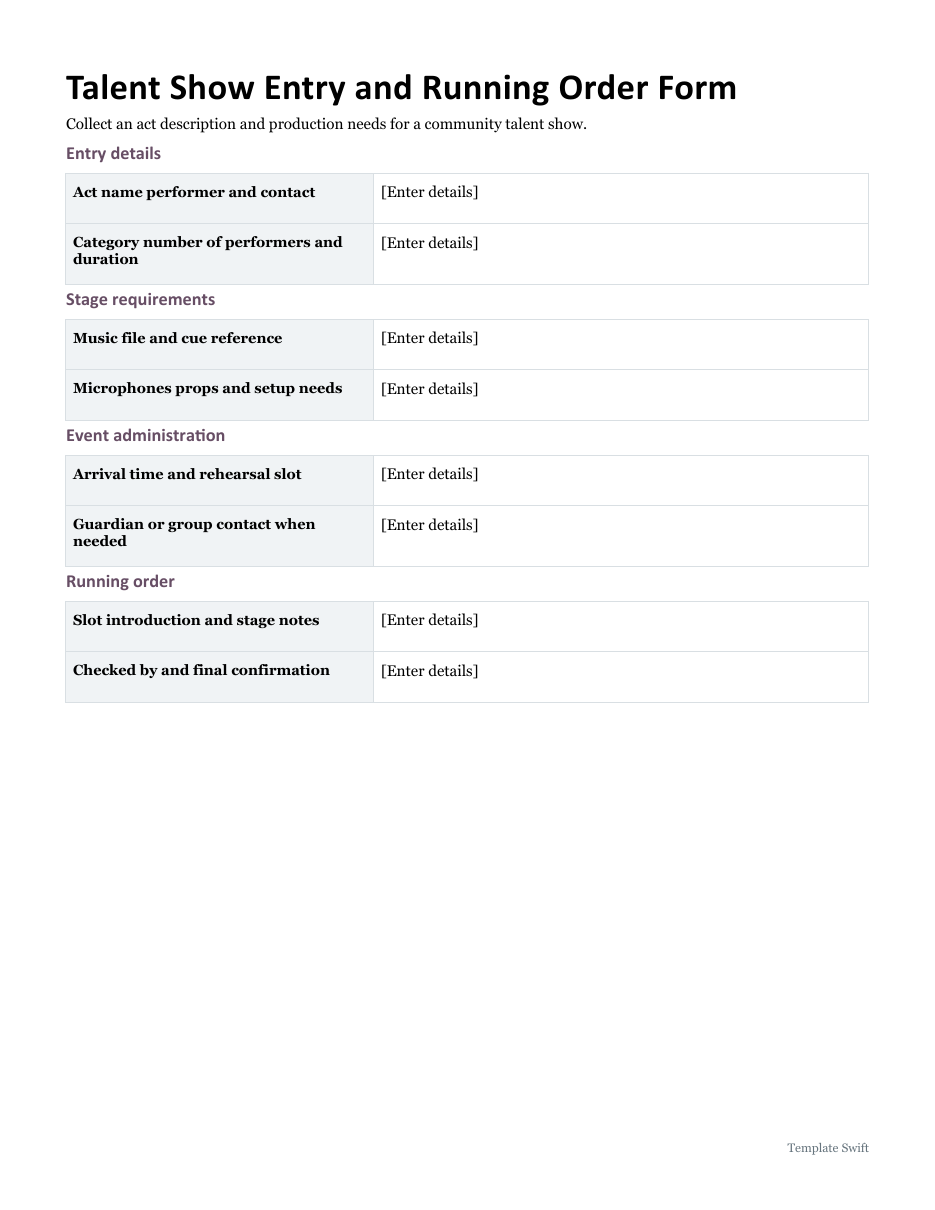
Talent Show Entry and Running Order Form
Collect an act description and production needs for a community talent show. Download the editable Word file below.
Frequently Asked Questions
How far ahead should I post talent show flyers?
For performer recruitment, three to four weeks before auditions. For the show itself, about two weeks ahead, with reminders in the final week.
Can I edit these flyers without design software?
Some designs come from online poster makers that you edit in the browser. Others are inspiration images, which you can recreate in Word, PowerPoint or a free design tool.
What should a talent show flyer for kids include?
Age or grade range, sign-up deadline, rehearsal dates, show date, and a parent contact. Keep the language simple and the design cheerful.
Is it okay to use performers’ photos on flyers?
Only with permission, and for minors, get a parent or guardian’s consent first. Many schools have their own photo policies, so check before you print.
