
Ever sat through a meeting where nobody quite knew why everyone was there? Twenty minutes in, the conversation drifts, the one decision that mattered gets pushed to “next time,” and people leave with different ideas about who is doing what. A simple meeting agenda template fixes most of that before the meeting even starts. It tells people what will be discussed, in what order, by whom and for how long, so they arrive prepared and leave with clear next steps.
We designed 8 free meeting agenda templates in Microsoft Word for the meetings people run most often: a simple all-purpose agenda, a weekly team meeting, a board of directors meeting, a project kickoff, a one-on-one, a client meeting, a detailed agenda with time slots and a committee meeting. Each one opens in Word or Google Docs, uses plain placeholder text in [brackets] that you can type over, and prints neatly on a single page.
What Makes a Good Meeting Agenda?
A good agenda is short, specific and shared ahead of time. It isn’t a script. It’s a promise to everyone in the room about how their time will be used. The best agendas usually have these parts:
| Part | What to write | Why it helps |
|---|---|---|
| Meeting details | Date, start and end time, location or video link | Removes the “where is it again?” emails |
| Purpose | One sentence on what the meeting must achieve | Keeps the discussion on track and makes it easy to cancel if the goal is already met |
| Topics | Specific items, phrased as questions where possible | “Which vendor do we pick?” beats “Vendors” |
| Owners | The person leading each item | That person comes prepared |
| Time limits | Minutes for each item | Stops one topic from eating the whole meeting |
| Pre-reading | Documents or links to review beforehand | Saves meeting time for discussion, not reading |
| Roles | Facilitator, note taker, timekeeper | Someone is responsible for flow, notes and the clock |
How to Write a Meeting Agenda in 6 Steps
- Decide if you need a meeting at all. If the goal is only to share information, an email or a short recorded update may be enough. Meetings are best for discussion and decisions.
- Write the purpose first. “Agree on the Q3 launch date” or “Choose a venue for the conference.” If you can’t write it in one sentence, the meeting isn’t ready yet.
- Ask attendees for topics. A quick message a few days before (“anything to add?”) surfaces issues early and makes people feel heard.
- Put the most important items first. Energy and attention are highest at the start. Leave routine updates for later, or move them to a written summary.
- Add owners and realistic times. Be honest: a real decision rarely takes five minutes. Leave a few minutes of buffer at the end.
- Send it 24 to 48 hours ahead with any pre-reading attached, so people can think before they talk.
Free Meeting Agenda Templates in Word
Each template below is a .docx file. Click Download, open it in Word, Google Docs or LibreOffice, replace the bracketed text and you’re ready to share.
1. Simple Meeting Agenda Template
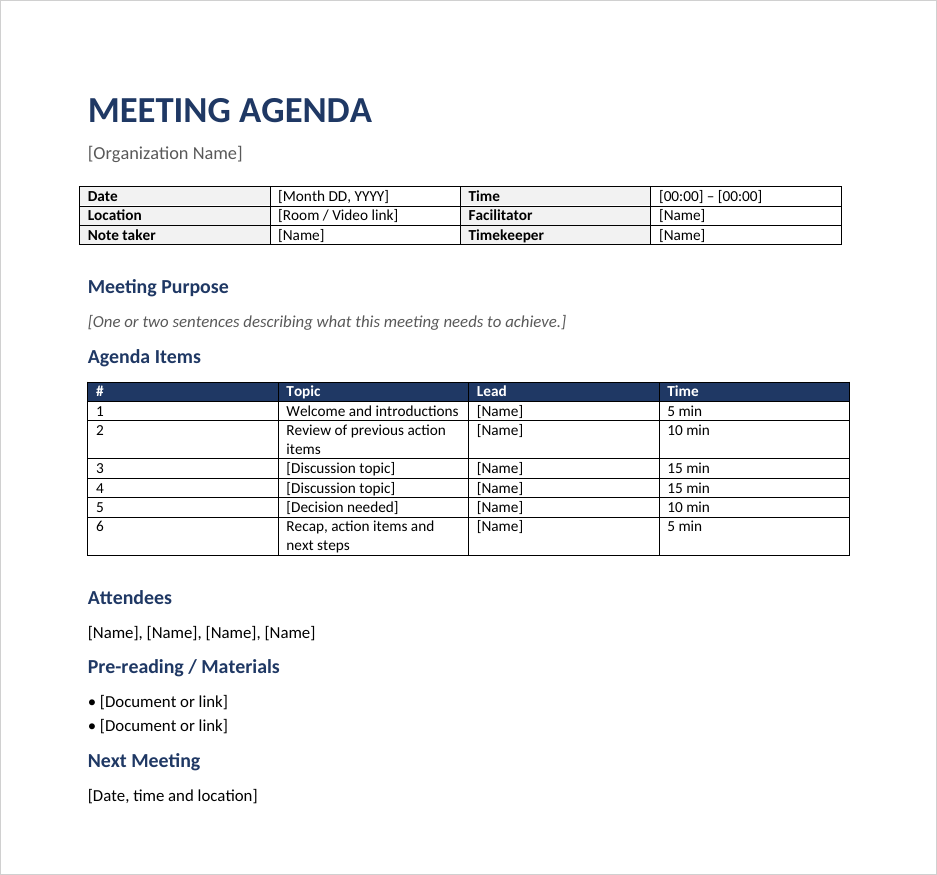
A clean, all-purpose layout with a details box (date, time, location, facilitator, note taker, timekeeper), a purpose statement, a numbered topic table with owners and time limits, plus space for attendees, pre-reading and the next meeting date. Start here if you just need something that works.
2. Weekly Team Meeting Agenda
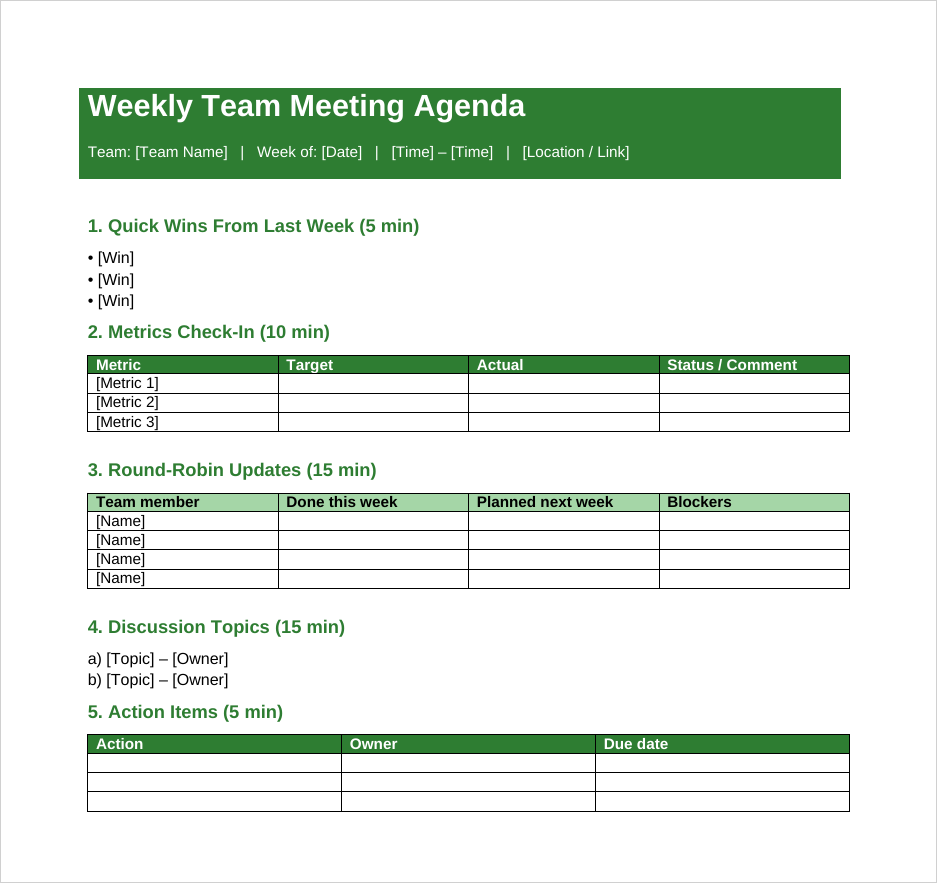
Built for recurring team check-ins. It opens with quick wins, moves to a small metrics table, then a round-robin grid where each person notes what they finished, what’s next and what’s blocking them. It ends with an action-item table so nothing discussed gets lost.
3. Board of Directors Meeting Agenda
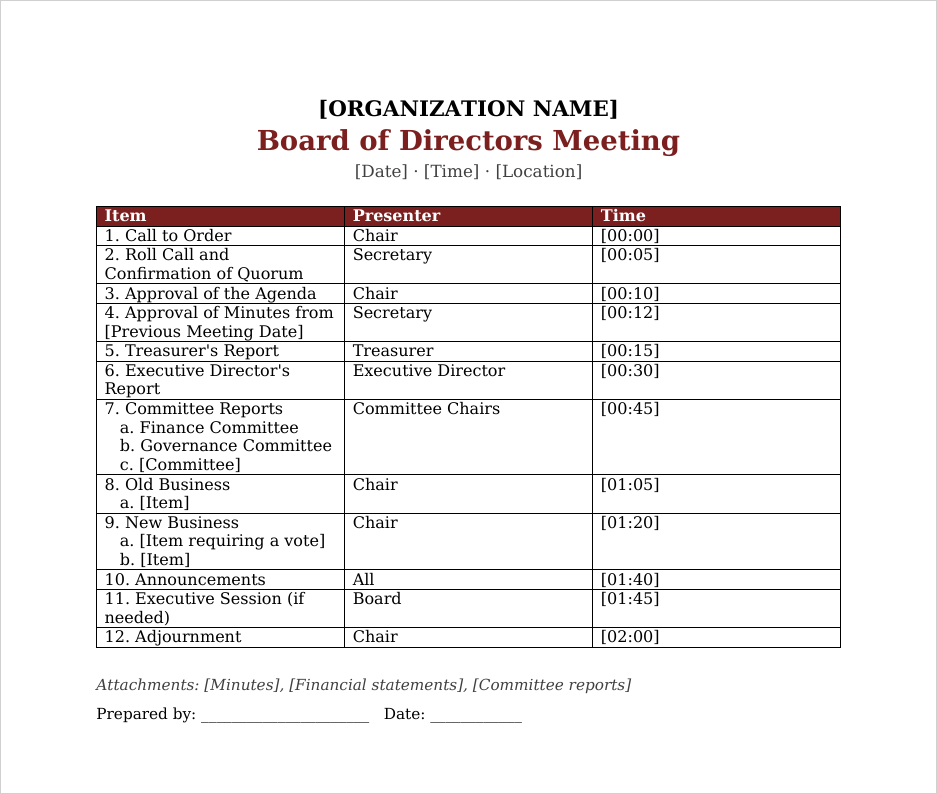
A formal agenda that follows the order most boards use: call to order, quorum, approval of the agenda and minutes, officer and committee reports, old business, new business, announcements, an optional executive session and adjournment, each with a presenter and time.
4. Project Kickoff Meeting Agenda
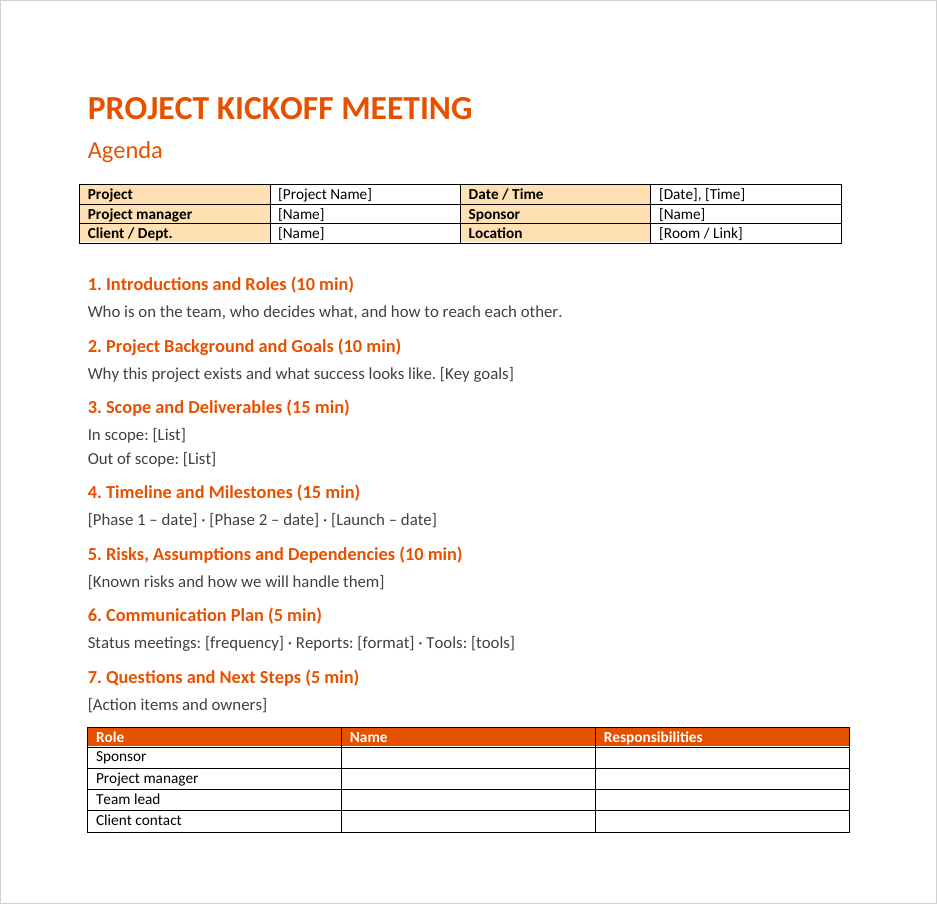
Covers everything a new project team needs to agree on in the first meeting: roles, goals, scope (including what’s out of scope), milestones, risks and the communication plan. A roles table at the bottom records who the sponsor, project manager and key contacts are.
5. One-on-One Meeting Agenda
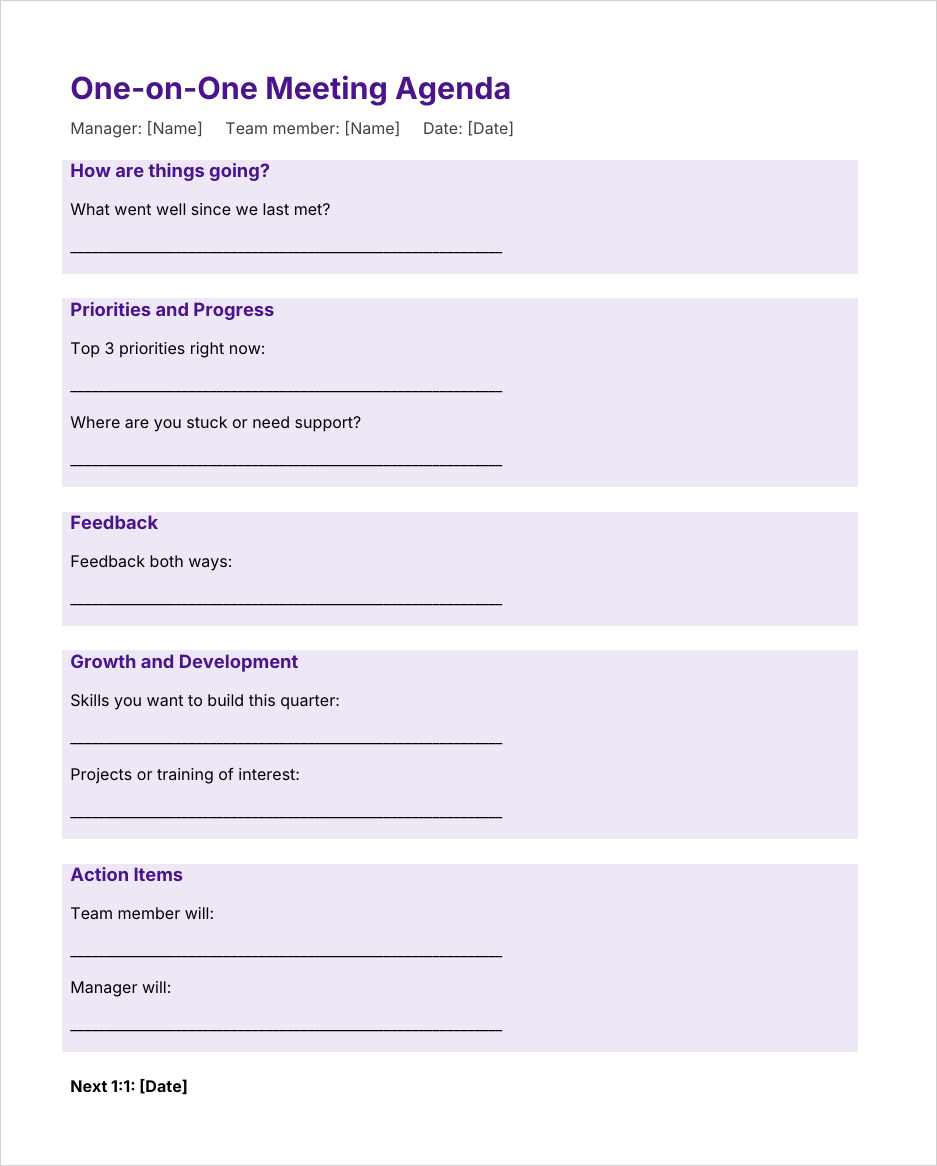
A friendly manager and employee template with shaded sections for a personal check-in, priorities, two-way feedback, growth goals and action items for both people. It keeps regular one-on-ones focused without feeling like a performance review.
6. Client Meeting Agenda
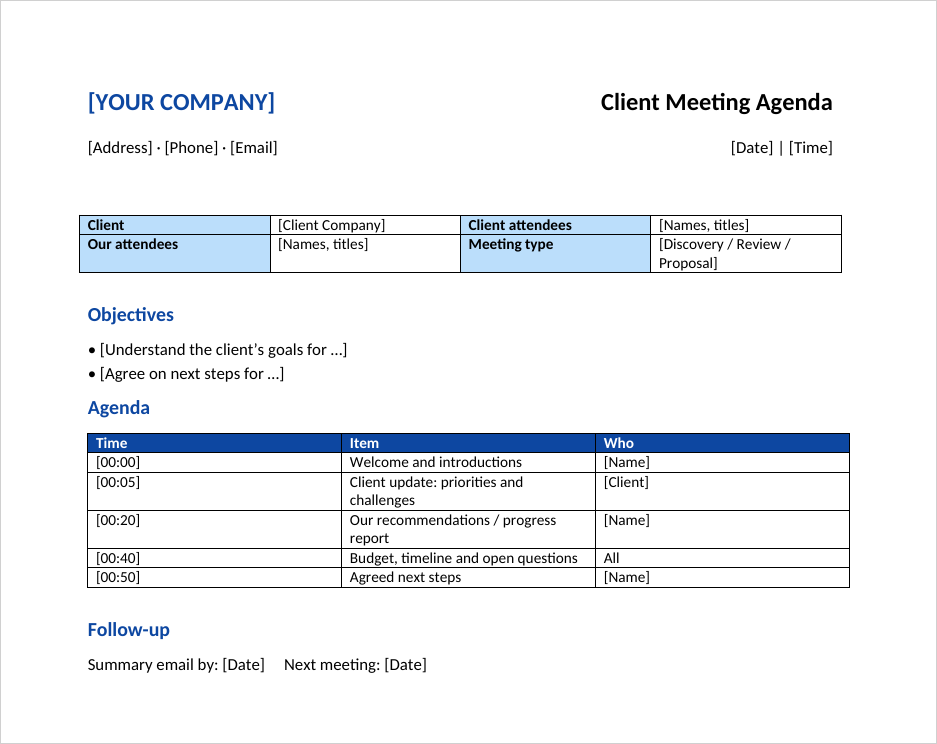
A branded layout with your company details at the top, a box for client and internal attendees, clear objectives, a timed agenda and a follow-up line. Use it for discovery calls, project reviews and proposal presentations.
7. Detailed Meeting Agenda with Time Slots
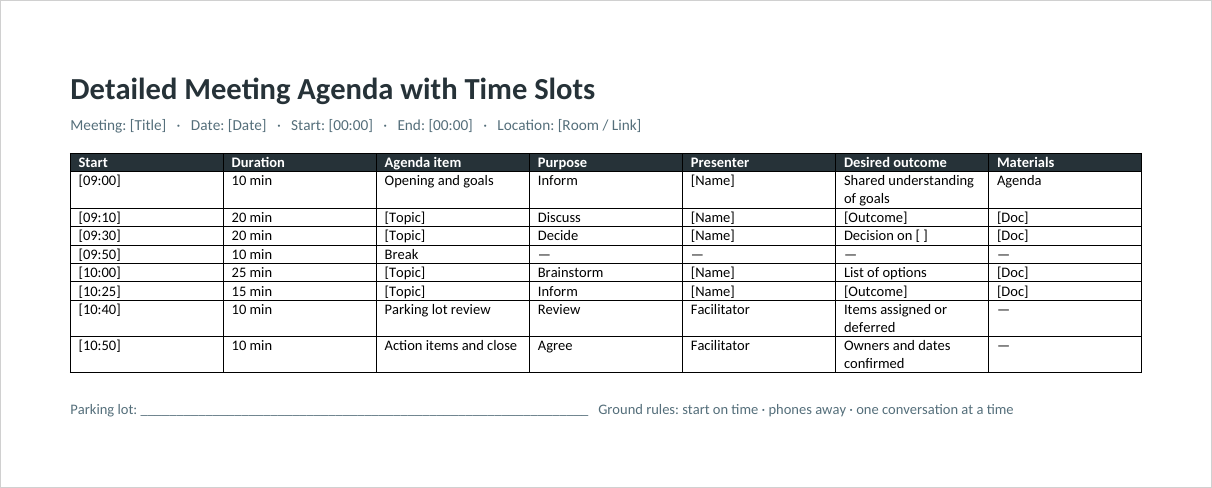
A landscape planner with columns for start time, duration, topic, purpose (inform, discuss, decide), presenter, desired outcome and materials. It includes a break, a parking-lot review and ground rules, which makes it ideal for workshops and longer sessions.
8. Committee Meeting Agenda
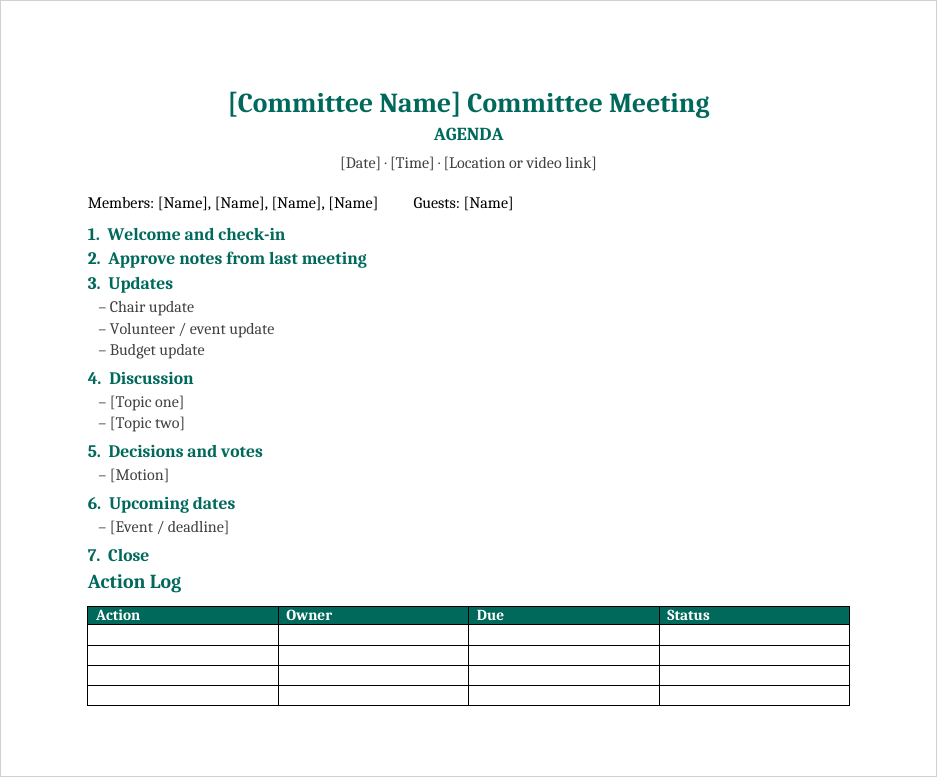
A simple, centered agenda for nonprofit, school, church and volunteer committees, with a members line, numbered sections for updates, discussion, votes and upcoming dates, and an action log table to track follow-ups between meetings.
Running the Meeting: Using the Agenda as a Tool
An agenda only works if you actually follow it. Put it on the screen or hand out copies, read the purpose aloud in the first minute, and let the timekeeper give a gentle warning when an item has two minutes left. When a new topic pops up that isn’t on the list, write it in a “parking lot” and promise to deal with it later, either at the end of the meeting or in a separate conversation. That one habit keeps meetings on time more than any other.
Close every meeting by reading back the decisions and action items: what will be done, by whom and by when. Then send a short summary the same day. If you need a formal record, our meeting minutes templates pair naturally with these agendas, because the minutes can follow the same numbered structure.
Agenda Ideas for Different Meetings
Daily stand-up (15 minutes)
Each person answers three questions: what I finished yesterday, what I’m doing today, and what’s blocking me. Problems get noted and solved after the stand-up with only the people involved.
Monthly all-hands
Leadership update, wins and recognition, key numbers, one or two deeper topics, and open questions from staff. Collect questions in advance so quieter people get heard too.
Brainstorming session
Set the challenge, give everyone a few minutes of silent idea writing, share ideas without judging them, group similar ones, then vote. The detailed agenda with time slots works well for this.
Parent-teacher or school committee meeting
Welcome, progress updates, upcoming events, volunteer needs and questions. The committee template’s action log helps when tasks are shared among volunteers.
Common Agenda Mistakes (and Quick Fixes)
- Topics that are too vague. “Marketing” could mean anything. Try “Approve the spring campaign budget.”
- Too many items. If the agenda doesn’t fit the time, cut or postpone items rather than rushing them all.
- No time for decisions. Updates fill the hour and the hard decision is left for the last two minutes. Flip the order.
- Inviting everyone. Only invite people who need to contribute or decide. Others can read the summary.
- Sending it at the last minute. An agenda that arrives five minutes before the meeting can’t help anyone prepare.
More Templates for Better Meetings
Planning a longer event with several sessions? Our event schedule templates lay out a full day by the hour. Keep track of who showed up with a printable sign-in sheet, turn agreed actions into a plan with a business action plan template, and use a checklist template to make sure the room, equipment and handouts are ready before people arrive. For recurring team reporting, a daily work report can replace a lot of status-update meetings.
Frequently Asked Questions
What should be included in a meeting agenda?
The meeting title, date, time and location, the purpose, a list of topics with the person leading each one and a time estimate, any pre-reading, and space for action items and the next meeting date.
How far in advance should I send a meeting agenda?
Ideally 24 to 48 hours before the meeting. For board meetings or anything with documents to review, send it about a week ahead if your bylaws or policies allow.
What is the difference between an agenda and minutes?
An agenda is the plan you share before the meeting. Minutes are the written record made during or after it, listing what was discussed, decided and assigned.
Can I use these meeting agenda templates in Google Docs?
Yes. Upload the downloaded .docx file to Google Drive and open it with Google Docs. The layout and tables carry over, and you can share the agenda with a link.
How long should a meeting agenda be?
One page is usually enough. If your agenda needs more, consider whether the meeting is trying to do too much, or attach supporting details separately.
Are these templates free for business use?
Yes. All eight templates are free to download, edit and use for work, school, nonprofit or personal meetings.
